
Module 11, Part 2: Error Handling with Exceptions#
In this second part of Module 11 we address how to report and handle errors in Java (via “Exceptions”). We also address the topic of getter and setter methods, where exceptions are often used.
Reporting and Handling Errors via Exceptions#
In this section we explore the use of exceptions in Java, by discussing:
The Exception Class and its Hierarchy#
In Java, Exception is the name of a class (provided by the Java API) used for
the purpose of reporting and handling “exceptional” situations (typically
errors) while the program runs.
An object of the class Exception can be created in the usual way, using new
— and typically using a constructor that takes as an argument a String with
an error message that explains the exception. For example, you can try on the
Java shell:
jshell> var e = new Exception("Something went wrong!")
e ==> java.lang.Exception: Something went wrong!
|  created variable e : Exception
Then, you can retrieve the message carried by the exception e via the method
e.getMessage():
jshell> System.out.println("Exception message: " + e.getMessage())
Exception message: Something went wrong!
Besides the class Exception, Java provides a whole hierarchy of classes that
describe various kinds of errors. The hierarchy is outlined in
Fig. 33 below, and each one of the classes can be
used to create a corresponding object carrying a message (as shown above). We
can also derive those classes to define our own custom exception classes.
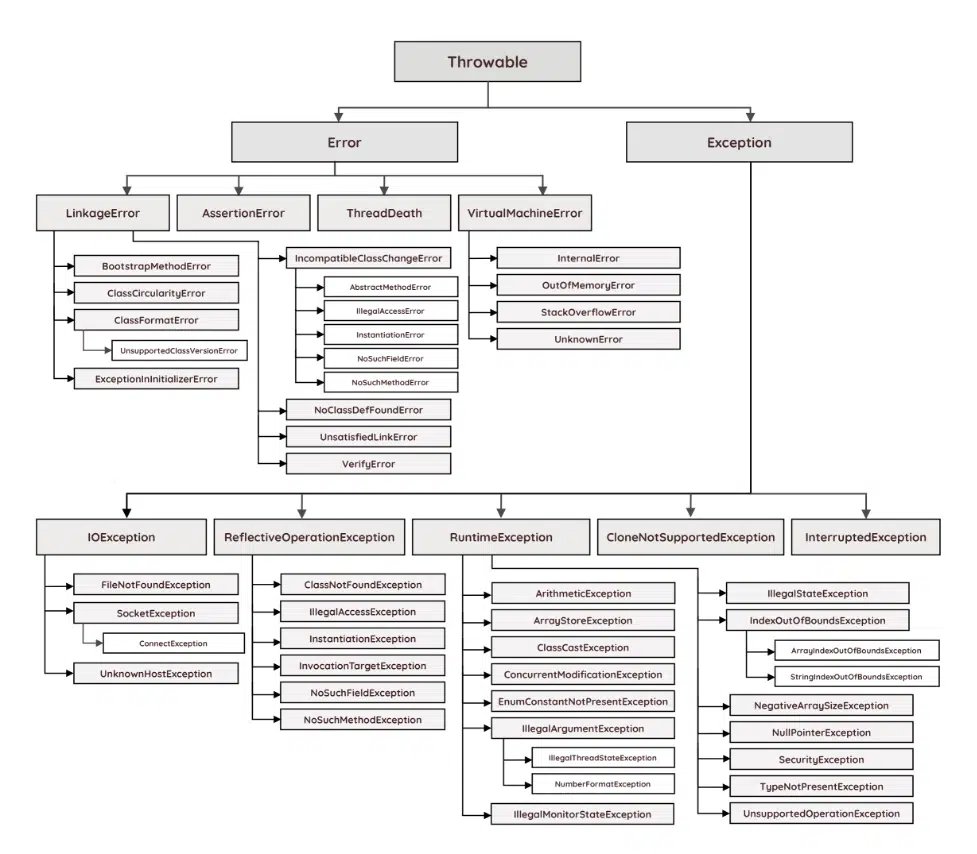
Fig. 33 Class hierarchy of exceptions and errors in Java. The branch starting with
Error contains classes that represent unrecoverable internal errors that
should not be normally handled by an application. The branch starting with
Exception contains classes that represent errors which may be recoverable, so
an application may want to handle them. (Image from
https://rollbar.com/blog/java-exceptions-hierarchy-explained/, copyright by
Rollbar Inc.)#
Throwing Exceptions#
Objects that derive from the class Throwable in
Fig. 33 can be thrown to report an error, using
the statement throw. When a method throws an exception (or, more generally, a
Throwable object), the execution of the method stops, and Java looks for some
surrounding code that can handle that exception (as we discuss later in
Handling Exceptions via try-catch-finally Statements). If the exception is not handled, the whole
program is terminated and the exception is printed on the console, together with
a stack trace that describes where the exception was thrown. This is
illustrated in Example 67 below.
Example 67 (Throwing an ArithmeticException)
Consider the following Java program: it defines and calls a static method
divide(x, y) which throws an ArithmeticException (listed in
Fig. 33) if the divisor y is equal to 0.
 1class Division {
 2    public static void main(String[] args) {
 3        System.out.println("The result of 3 divided by 0 is...");
 4        System.out.println(divide(3, 0));
 5        System.out.println("Bye!");
 6    }
 7
 8    private static int divide(int x, int y) {
 9        if (y == 0) {
10            throw new ArithmeticException("Division by zero! :-(");
11        } else {
12            return x / y;
13        }
14    }
15}
If we run the program above, it produces the following output:
The result of 3 divided by 0 is...
Exception in thread "main" java.lang.ArithmeticException: Division by zero! :-(
	at Division.divide(Division.java:10)
	at Division.main(Division.java:4)
This happens because the exception thrown on line 10 is not handled anywhere in
the program, and therefore Java terminates the program. In fact, you can notice
that, after the first line of output, the program does not print Bye!: this
is because the exception is thrown when the static method divide(...) is
running, hence the program terminates while executing line 4, and before
executing line 5.
The output printed on the console reports the error message used to create the
exception (Division by zero! :-() and a stack trace showing that:
the exception was thrown in the method
Division.divide, on line 10 of the fileDivision.java, andthat method, in turn, was called by the method
Division.mainon line 4 of the fileDivision.java.
With this information we can find where the exception was thrown while the program was running, and this can be helpful for debugging.
Handling Exceptions via try-catch-finally Statements#
To handle an exception, we can surround the code that might throw an exception
with a try-catch-finally statement, which has the following shape:
 1try {
 2    // Code that might throw an exception
 3} catch (ExceptionClass1 e1) {
 4    // Code that handles exceptions of type ExceptionClass1
 5} catch (ExceptionClass2 e2) {
 6    // Code that handles exceptions of type ExceptionClass2
 7} ... {
 8    ...
 9} finally {
10    // Code that is always executed before leaving the try-catch block
11}
The code of the try-catch-finally statement outlined above is executed as
follows.
First, Java executes the code inside the
try { ... }block (line 2).If that code does not throw any exception, then the execution continues with the code in the
finallyblock.Otherwise, if the code inside
try { ... }throws an exception of the classE, then Java checks the exception classes specified in the variouscatchblocks (line 3, line 5, etc.) looking for one that is equal toEor is a superclass ofE.If
ExceptionClass1is equal toE(or is a superclass ofE), Java executes the code on line 4, with variablee1containing the exception object thrown from inside thetry { ... }block. Then, Java executes thefinallyblock (line 10).Otherwise, if
ExceptionClass2is equal toE(or is a superclass ofE), Java executes the code on line 6, with variablee2containing the exception object thrown from inside thetry { ... }block. Then, Java executes thefinallyblock (line 10).Otherwise, Java continues similarly checking the other
catchclauses (if any).If none of the
catchclauses handles the exception thrown from inside thetry { ... }block, then Java executes the code in thefinallyblock (line 10), and then throws the exception again.
Note
The
finallyblock is optional, and is often not used. (In fact, thetry-catch-finallystatement is often simply called “try-catchstatement.”)It is possible to nest
try-catch-finallystatements: if an exception is thrown but not caught by any innercatchclause, it may be caught by an outercatchclause.The code inside
catchandfinallyclauses can throw exceptions, too: if this happens, the exception may be handled by a surroundingtry-catch-finallystatement. If no exception is thrown bycatchnorfinally, then the execution continues with the code that follows the wholetry-catch-finallystatement.
This might sound complicated — and indeed, it is! Catching and throwing exceptions can lead to very complex code that can be hard to understand and maintain. In this course we will focus on simple uses of exceptions.
The behaviour of a simple try-catch statement is illustrated in
Example 68 below.
Example 68 (Throwing and catching ArithmeticException)
Let us revise the code of Example 67 by adding
a try-catch statement that handles the ArithmeticException thrown by the
static method divide(...): (the differences with
Example 67 are highlighted)
 1class Division {
 2    public static void main(String[] args) {
 3        System.out.println("The result of 3 divided by 0 is...");
 4
 5        try {
 6            System.out.println(divide(3, 0));
 7        } catch (ArithmeticException e) {
 8            System.out.println("*** Exception caught: " + e.getMessage());
 9        }
10
11        System.out.println("Bye!");
12    }
13
14    private static int divide(int x, int y) {
15        if (y == 0) {
16            throw new ArithmeticException("Division by zero! :-(");
17        } else {
18            return x / y;
19        }
20    }
21}
If we run the program above, it produces the following output:
The result of 3 divided by 0 is...
*** Exception caught: Division by zero! :-(
Bye!
You can observe that the exception thrown by the static method divide has been
caught on lines 7–9: in fact, the program has not been immediately terminated
by the exception, and Java has not printed on the console any stack trace.
Instead, the program prints *** Exception caught: ... (line 8) and then
continues executing the rest of main(...), by printing Bye! (line 10) and
then terminating regularly.
Checked Exceptions#
Most of the exception classes shown in the hierarchy in
Fig. 33 are checked by the Java compiler — i.e.
if a checked exception might be thrown somewhere in your program, the Java
compiler will make sure that your code “does something” about it, and you (as a
programmer) do not “forget” that the exception might be thrown. Every
subclass of Throwable in Fig. 33 is checked —
except the subclasses of Error and RuntimeException.
If a method might throw an exception of a checked class E, then the method
declaration must highlight this possibility, by adding ... throws E after the
method’s name and arguments. The only way to avoid this is to handle the
checked exception E inside the method, with a try-catch statement that
catches E.
The use of checked exceptions is illustrated in Example 69 below.
Example 69 (Handling a checked exception)
Let us modify the code of Example 68 by
replacing line 16 with the following line, which throws an exception of
type java.io.IOException (instead of ArithmeticException):
16 throw new java.io.IOException("Division by zero! :-(");
If we do this, Java will report an error on this line, saying that the exception is not handled. To address the error, we must either:
surround the
throw ...statement with atry-catch-finallyblock that handles exceptions of typejava.io.IOException, ordeclare that the method
divide(...)might throw that exception, by modifying the method declaration (on line 14) as:14 private static int divide(int x, int y) throws java.io.IOException {
If we follow the second option, we obtain an error in the main method, which
does not handle exceptions of type java.io.IOException. Again, we have two
options:
revise the
try-catchstatement on lines 5–9 to handle exceptions of typejava.io.IOException, ordeclare that the method
main(...)might throw that exception, by modifying the method declaration (on line 2) as:2 public static void main(String[] args) throws java.io.IOException {
If we follow again the second option, the code will look as follows: (the differences with Example 68 are highlighted)
 1class Division {
 2    public static void main(String[] args) throws java.io.IOException {
 3        System.out.println("The result of 3 divided by 0 is...");
 4
 5        try {
 6            System.out.println(divide(3, 0));
 7        } catch (ArithmeticException e) {
 8            System.out.println("*** Exception caught: " + e.getMessage());
 9        }
10
11        System.out.println("Bye!");
12    }
13
14    private static int divide(int x, int y) throws java.io.IOException {
15        if (y == 0) {
16            throw new java.io.IOException("Division by zero! :-(");
17        } else {
18            return x / y;
19        }
20    }
21}
And if we run this code, the program will terminate as soon as it throws the exception, with the following output: (similar to Example 67)
The result of 3 divided by 0 is...
Exception in thread "main" java.io.IOException: Division by zero! :-(
	at Division.divide(Division-checked.java:16)
	at Division.main(Division-checked.java:6)
As an alternative, we could have e.g. caught the IOException inside
main(...), as follows: (the
differences with Example 68 are
highlighted)
 1class Division {
 2    public static void main(String[] args) {
 3        System.out.println("The result of 3 divided by 0 is...");
 4
 5        try {
 6            System.out.println(divide(3, 0));
 7        } catch (ArithmeticException e) {
 8            System.out.println("*** Exception caught: " + e.getMessage());
 9        } catch (java.io.IOException e) {
10            System.out.println("*** IOException caught: " + e.getMessage());
11        }
12
13        System.out.println("Bye!");
14    }
15
16    private static int divide(int x, int y) throws java.io.IOException {
17        if (y == 0) {
18            throw new java.io.IOException("Division by zero! :-(");
19        } else {
20            return x / y;
21        }
22    }
23}
Note that on line 2 of this last program we do not need to declare that
main(...) can throw a java.io.IOException, because that exception is now
caught on lines 9–10. If we run this last program, its output is:
The result of 3 divided by 0 is...
*** IOException caught: Division by zero! :-(
Bye!
Note
In Example 68 we did not need to worry
about adding ... throws ArithmeticException to the declaration of the method
divide(...). This is because ArithmeticException is a subclass of
RuntimeException (see hierarchy in Fig. 33), hence
ArithmeticException is not a checked exception (whereas the
java.io.IOException used in Example 69
is checked).
Getters and Setters#
We have seen that, when writing Java classes, it is often good practice to:
keep the fields private (when possible), to reduce the programming interface exposed by our classes and objects;
make the public fields static (when possible) to ensure that everyone can read the value of the fields, but nobody can change value of the the field by mistake.
There is, however, a very common third scenario: we may want to write a class that makes a field available to everyone for both reading and updating — but we want to ensure that field updates are always correct. The recipe for this scenario is to:
make the field
private, andprovide a
publicgetter method that returns the current value of the field, andprovide a
publicsetter method that updates the value of the field, after performing some correctness checks (and executing other code, if needed). If the setter method is called with an incorrect argument, then the setter can immediately throw an exception, so the presence and position of the bug is clearly evident and can be fixed more easily.
This idea is illustrated in Example 70 below.
Example 70 (Validating serial codes)
Let us consider again the code for the office supplies shop in
Example 61: the abstract class Device
includes a private field serialCode (of type String) that is set by the
constructor (when an object is created) and cannot be changed afterwards.
Now, suppose we have two new requirements:
it must be possible to change the serial code of an existing object of the class
Device;serial codes must always be valid, i.e. they cannot be
nulland must have the formXXXX-YYYY— whereXXXXmust be 4 lowercase letters, andYYYYmust be 4 digits.
To satisfy this requirement, we could revise the class Device as follows.
We implement a serial code validity check, by writing an auxiliary static method
isSerialCodeValid(code)that returnstrueorfalsedepending on whether the given serialcodeis valid or not;We keep the field
serialCodeasprivate(which already is), and we provide:a
publicgetter methodgetSerialCode()that returns the current value of theprivatefieldthis.serialCode; (note that the classDevicein Example 61 already provides this method)a
publicsetter methodsetSerialCode(code)which checks whether the given serialcodeis valid (using the static methodisSerialCodeValid(...)):if the given serial code is valid, then the setter method
setSerialCode(...)updates the value of theprivatefieldthis.serialCode;otherwise, the setter method
setSerialCode(...)throws a suitable exception — for instance, it could throw anIllegalArgumentException(listed in Fig. 33).
Finally, we update the constructor of the class
Deviceto check the serial code when a new object is created, and throw an exception if the serial code is not valid. To this end, the constructor can simply call the setter methodthis.setSerialCode(...).
The revised class Device is shown below, where the differences with
Example 61 are highlighted. (Note: the rest
of the classes and interfaces in Example 61
and the file OfficeSupplies.java in Example 53 are
unchanged.)
 1abstract class Device {
 2    private String model;
 3    private String serialCode;
 4
 5    public Device(String model, String serialCode) {
 6        this.model = model;
 7        this.setSerialCode(serialCode);
 8    }
 9
10    public String getModel() {
11        return this.model;
12    }
13
14    public String getSerialCode() {
15        return this.serialCode;
16    }
17
18    public void setSerialCode(String code) {
19        if (isSerialCodeValid(code)) {
20            this.serialCode = code;
21        } else {
22            throw new IllegalArgumentException("Invalid serial code: " + code);
23        }
24    }
25
26    public abstract String getDescription();
27
28    private static boolean isSerialCodeValid(String code) {
29        // The serial code cannot be null
30        if (code == null) {
31            return false;
32        }
33
34        // The serial code must have the form XXXX-YYYY, so we try to split it
35        // around the separator "-"
36        var codeSplit = code.split("-");
37        if (codeSplit.length != 2) {
38            return false;
39        }
40
41        var firstPart = codeSplit[0];
42        var secondPart = codeSplit[1];
43
44        // Both parts of the serial code must be 4 characters long
45        if ((firstPart.length() != 4) || (secondPart.length() != 4)) {
46            return false;
47        }
48
49        // The first part must only contain lowercase letters
50        for (var i = 0; i < firstPart.length(); i++) {
51            var c = firstPart.charAt(i);
52            if (!((c >= 'a') && (c <= 'z'))) {
53                return false;
54            }
55        }
56
57        // The second part must only contain digits
58        for (var i = 0; i < secondPart.length(); i++) {
59            var c = secondPart.charAt(i);
60            if (!((c >= '0') && (c <= '9'))) {
61                return false;
62            }
63        }
64
65        return true; // If we get here, the serial code is valid!
66    }
67}
Now, the revised constructor of the class Device is used by all subclasses
defined in in Example 61 (Scanner,
Printer, AllInOne), since they all call super(...). Moreover, those
subclasses inherit the new setter method setSerialCode(...).
Furthermore, the program OfficeSupplies.java in
Example 53 still compiles and runs with the updated class
Device above — but if we actually run the program, it terminates with an
exception like the following:
Exception in thread "main" IllegalArgumentException: Bad serial code A123Z
	at Device.setSerialCode(Device.java:22)
	at Device.<init>(Device.java:7)
	at Scanner.<init>(Device.java:76)
	at OfficeSupplies.main(OfficeSupplies.java:3)
The error message carried by the exception tells us that an invalid serial code
A123Z is being set. The last line of the stack trace points to line 3 in the
file OfficeSupplies.java — and indeed, that line contains the creation of a
new Scanner object with an invalid serial code:
3 var s1 = new Scanner("Canon CanoScan Lide 300", 4800, "A123Z");
We can fix that line by writing a valid serial code, e.g.:
3 var s1 = new Scanner("Canon CanoScan Lide 300", 4800, "abcd-1234");
and if we replace all serial codes used in OfficeSupplies.java with valid
serial codes, the program will run correctly.
We can now also change the serial code of an object after its creation, using
the new setter method setSerialCode(...). However, if we use that method with
an invalid serial code like:
s1.setSerialCode("hej");
then the program will terminate with an IllegalArgumentException (as above).
Instead, if we write a valid serial code like:
s1.setSerialCode("blah-6789");
then the program will run correctly.
Note
Calling an overridable method (like our setSerialCode(...)) from a constructor
is not generally considered good practice in Java programs (for more details
and references, see this post on Stack
Overflow). This example does it to keep
things simple — but a better solution would be e.g. to write the serial code
validation in a private method that is called by both the constructor and
setSerialCode(...).
Concluding Remarks#
You should now have an understanding of the following topics:
how to use exceptions to report and handle errors in your Java programs;
how to write getter and setter methods for protecting and validating the fields of an object.
We have only touched upon these topics: exception handling can become rather complex, and we have only seen a small part of the file I/O functionalities provided Java. You will likely learn more about these topics by writing more complex programs, and exploring the Java API documentation.
References and Further Readings#
You are invited to read the following sections of the reference book:
Section 11.1 - “Exception Handling”
Section 11.2 - “Uncaught Exceptions”
Section 11.3 - “The
try-catchStatement”Section 11.4 - “Exception Propagation”
Section 11.5 - “The Exception Class Hierarchy”
Exercises#
Note
These exercises are not part of the course assessment. They are provided to help you self-test your understanding.
Exercise 33 (Experimenting with exception classes)
Take the code in Example 67 and experiment by
changing the ArithmeticException into some other exception class listed in
Fig. 33: observe what changes when you select a
subclass of RuntimeException, and what changes when you select some other
exception class that is checked.
Note
The exception names in Fig. 33 are often abbreviated:
e.g. the figure shows IOException instead of java.io.IOException.
To find the full name e.g. of the exception SocketException, you can search
for it in the
Java API documentation
(using the search box in the top-right corner of the page), and this will lead
you to
this page
showing the complete name java.net.SocketException.
Lab and Weekly Assessments#
During the lab you can try the exercises above or begin your work on the weekly assessments below.
Important
For each assessment, you can download the corresponding handout and submit your solution on DTU Autolab: https://autolab.compute.dtu.dk/courses/02312-E24.
For details on how to use Autolab and the assessment handouts, and how to submit your solutions, please read these instructions.
If you have troubles, you can get help from the teacher and TAs.
06 - Dates, Version 2#
This is a follow-up to the assessment 06 - Dates: the starting
point is the file Date.java that solves 06 - Dates (either
your own file, or the one provided by the teacher as a solution to
06 - Dates).
The class Date developed thus far is a bit fragile and may lead to buggy code,
because:
it can be used by Java programs to create
Dateobjects containing invalid dates, andit provides a method
.isValid()— but a programmer can easily forget to call this method every time he/she creates aDateobject.
Therefore, the goal is to improve the class Date in the file Date.java, with
the following changes:
Each object of the class
Datemust provide the followingpublicand final fields that store the year, month, and day:public final int year; public final int month; public final int day;
The class
Datemust provide the following constructor (as before):public Date(int y, int m, int d)
However, the constructor must now check if the given year
y, monthm, and daydrepresent a valid date: if not, the constructor must throw anIllegalArgumentException. Otherwise (i.e.y,m, anddrepresent a valid date), the constructor must initialise the newDateobject as expected.Dateobjects do not need to provide this method any more:public boolean isValid()
In fact, the method is now redundant (because every
Dateobjects always contains a valid date).Hint
Instead of simply removing the method
isValid(), you could make itprivateand use it inside the constructor to check whether a date is valid, as required above…
The handout includes some Java files called Test01.java, Test02.java, etc.:
they are test programs that use the class Date, and they might not compile or
work correctly until you complete the implementation of Date.java. You should
read those test programs and try to run them, but you must not modify them.
When you are done, submit the modified file Date.java on DTU Autolab.
Warning
The automatic grading on DTU Autolab includes some additional secret checks that test your submission with more dates (either valid or invalid). After you submit, double-check your grading result on DTU Autolab: if the secret checks fail, then your solution is not correct, and you should fix it and resubmit.
07 - Contacts#
Your are helping in the development of a contact management application. Your
task is to implement a class called Contact which can store the name, surname,
phone number, and email address of a contact.
Importantly, the class Contact must ensure that the name, surname, phone
number, and email address of the contact are stored as Strings and are always
valid, according to the following rules:
the name and surname cannot be
nullnor empty;the phone number cannot be
null, and it must consist of one or more digits; it may optionally begin with+. For instance, both45123123and+45123123are valid phone numbers, whereasabcand123+456are not;the email address cannot be
nulland must have the formrecipient@host, where bothrecipientandhostare non-empty sequences of characters that can be either digits, letters, or the dot.. For instance,alcsc@dtu.dkands123456@student.dtu.dkare valid email addresses, whereasalcscand@dtu.dkare not valid email addresses;
To enforce the rules above, the fields of the class Contact that store the
name, surname, phone, and email, must all be private and only accessible via
getters and setters.
Edit the file Contact.java and implement the class Contact, with the
following requirements:
The class
Contactmust provide the constructor:public Contact(String name, String surname, String phone, String email)
The constructor must check whether the given arguments
name,surname,phone, andemailare valid, in this order, according to the rules above. If one of the arguments is invalid, the constructor must throw anIllegalArgumentExceptioncarrying one of the following error messages (depending on the first invalid argument):"Invalid name""Invalid surname""Invalid phone number""Invalid email address"
If all arguments are valid, the constructor must initialise the new object as expected.
The class
Contactmust provide the following getters, which retrieve the value of their corresponding field ofthisobject:public String getName() public String getSurname() public String getPhone() public String getEmail()
The class
Contactmust provide the following setters, which change the value of their corresponding field ofthisobject:public void setName(String name) public void setSurname(String surname) public void setPhone(String phone) public void setEmail(String email)
Before updating the object fields, each one of these setters must check whether its argument is valid according to the rules above: if not, the setter must throw an
IllegalArgumentExceptioncarrying one of the error messages listed in the description of the constructor (see above).
The handout includes some Java files called Test01.java, Test02.java, etc.:
they are test programs that use the class Contact, and they might not compile
or work correctly until you complete the implementation of Contact.java. You
should read those test programs and try to run them, but you must not modify
them.
When you are done, submit the modified file Contact.java on DTU Autolab.
Warning
The automatic grading on DTU Autolab includes some additional secret checks that test your submission with more contacts (using either valid or invalid arguments for the constructor and the setters). After you submit, double-check your grading result on DTU Autolab: if the secret checks fail, then your solution is not correct, and you should fix it and resubmit.
Hint
The class
Contactin the handout already contains some auxiliary static methods to check whether a character is a digit or a letter.To validate the fields of
Contact, you may take inspiration from Example 70. Also the solution to 04 - Characters may be handy…Remember that, if
stris aString, then you can use:str.charAt(n)to get the character at positionn;str.split(separator)to split the string around the givenseparator.
For more details, see Some Useful String Methods and Example 35.
Since the constructor and the setters in the class
Contactperform similar checks, you should try to avoid code duplication. There are multiple ways to do it: when the teacher publishes the solution to this assessment, compare it with your code.